5Sixty3 Sound

Dubuque's only High Quality Car Audio and Electronics Retailer and Installation Facility

3366 Center Grove Drive - Suite 4 - Dubuque, IA 52003 563-239-1931
  • Home
  • Services
    • Car Audio
    • Custom Installation
    • Marine Audio
    • Remote Starters
    • Safety Cameras
  • Brands
    • Audio Dynamics
    • Under Construction
  • About Us
  • Location
  • Contact Us
  • Facebook

What is Bluetooth?

BluetoothIf you have been around the mobile electronics industry for any amount of time, you will know that certain terms are often used incorrectly. One term that has been over-abused lately is Bluetooth. Product manufacturers, retailers and consumers have developed an expectation of what Bluetooth is, and what it does. Sadly, those expectations can lead to confusion and undesirable results. This article explains what Bluetooth is, and how it is used.

What is Bluetooth?
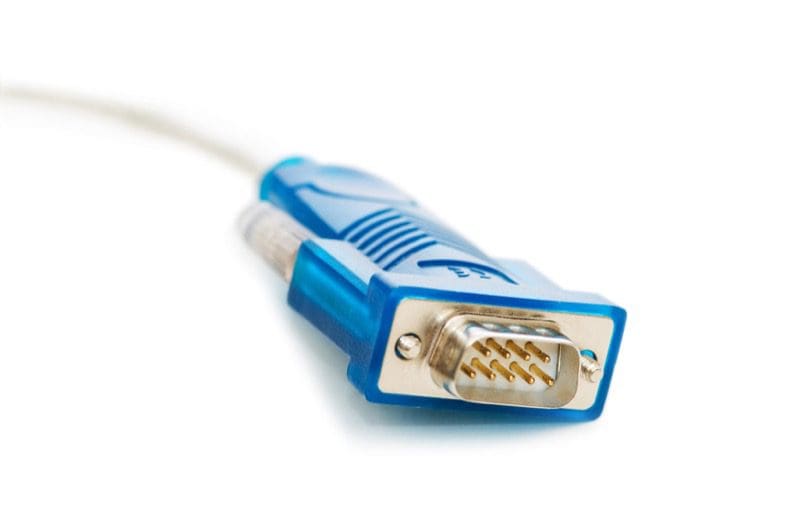
BluetoothBack in the dark ages, we had to connect electronic devices with wires. We also created wheels from boulders using animal bones as tools. RS-232 was a popular type of communication protocol for devices like modems, printers, scanners and cameras. Two wires would carry data between these devices and your computer. In 1994, Ericsson – a telecommunications and network equipment manufacturer in Stockholm, Sweden – introduced a wireless alternative to RS-232 called Bluetooth.

Bluetooth is a low-power, high-speed wireless communication protocol. Bluetooth operates using short-wave UHF radio waves in the frequency band of 2.4 to 2.485 GHz. Within this range of frequencies are 79 dedicated Bluetooth channels. Bluetooth uses Frequency Hopping Spread Spectrum to reduce errors and allow multiple devices to operate within the same frequency spectrum.

Bluetooth is used for short-range data communication between devices like computer and keyboards, video game controllers and consoles, and cellular phones and wireless devices. There are applications for medical applications such as monitoring heart rate, blood pressure and glucose levels. That said, many industrial applications exist between sensors in production systems and control computers.

Bluetooth Profiles

The misconception many people in the mobile electronics industry have is that Bluetooth exists to let cellular phones make calls and stream music to our radios. Bluetooth is far more involved and flexible than that.

Any talk of Bluetooth functionality is a perfect segue to introduce us to profiles. A Bluetooth profile is a set of instructions and commands that operate over a Bluetooth connection. Profiles simplify the communication between devices. In our industry, we are used to four common profiles:
PBAP – Phonebook Access Profile

HFP – Hands-free Profile

A2DP – Advanced Audio Distribution Profile

AVRCP – Audio Video Remote Control Profile

These profiles are used in varying combinations to allow you to connect your phone to your car radio so you can make phone calls and stream music. A few companies that have wanted to provide an Internet connection to their radio have used DUN to accomplish this task.

PBAP Profile

The Phone Book Access Profile allows your source unit to receive phonebook entry information, as well as manage it. Phonebook entries are transmitted and managed by the radio in vCard 2.1 or vCard .0 formats. Missed, received and dialed numbers are listed as well.

HFP Profile

The Hands-free Profile carries monaural audio between the phone and a secondary device. The profile also supports commands to answer or reject incoming calls; place a call; use memory data to place a call, terminate a call or manage phone volume level; and send phone status information, including battery, roaming status and signal strength . These functions are included in version 1.5 of the Hands-free Profile. Future versions, such as 1.7, will include support for wideband speech and the use of external audio compression and decompression codecs.

A2DP Profile

The Advanced Audio Distribution Profile operates within another profile called the Generic Audio/Video Distribution Profile (GAVDP). A2DP is responsible for allowing us to stream audio from a device such as a smartphone to a radio or powered speaker. The basic profile allows for stereo audio to be transmitted at a sampling frequency of 44.1 kHz at up to 328 kb/s. The use of a third-part codec such as aptX from Qualcomm or LDAC from Sony may further improve on bandwidth.

AVRCP Profile

Functioning alongside the GAVDP profile is the Audio Video Remote Control Profile. AVRCP is responsible for the display of song title, artist and album information, and control over playback device functions. If you can imagine a button on a DVD remote control, the AVRCP is likely to support it. Most car audio source units include functions like play, pause, fast-forward and rewind. The most recent versions of AVRCP include support for folder navigation and searching.

What Bluetooth Doesn’t Do

Although the Bluetooth Special Interest Group (SIG) works to manage the different Bluetooth communication and profile standards, there are variations in functionality between profile versions and, more importantly, between smartphone vendors. This latter fact can be a significant issue for buyers of car audio source units. The expectation that it “should work,” while not unreasonable, is not always possible. To expect a seven- or eight-year-old radio to work flawlessly with a brand-new iPhone 7 or Samsung Galaxy S8 isn’t reasonable. The hardware in the older units cannot be upgraded.

How to Buy Bluetooth

BluetoothIf you are shopping for a new source unit, take any smartphone you want to use with it to the retailer. Ask to pair your phone with the demo unit on display. Check that your entire list of phone contacts transfers as expected. Make sure you can use voice control functions if they apply to your phone. See that you can make calls easily. Finally, check that your phone reconnects reliably to the source unit by cycling power on the source a few times.

If you purchase a new radio and have it installed, only to find out it is not compatible with your smartphone, there is often nothing that can be done quickly. Some manufacturers do release updates for Bluetooth functionality, but these updates are not going to turn a Bluetooth 3.0 system into a 4.0, or add AVRCP 1.4 to a system that shipped with AVRCP 1.2. Do your research before you buy!

If you are looking for a hands-free solution to make phone calls or stream music to your audio system, drop in at your local mobile electronics specialist retailer. Bring your phone, pair the Bluetooth connection and experiment with the options.

This article is written and produced by the team at www.BestCarAudio.com. Reproduction or use of any kind is prohibited without the express written permission of 1sixty8 media.
Filed Under: ARTICLES, Car Audio, RESOURCE LIBRARY

Product Spotlight: ADS iDatalink Maestro APX Kits

Maestro APX

In February of 2025, Automotive Data Solutions (ADS) introduced the world to a new way of installing car radios. In their presentation, they discussed how aftermarket source unit installations evolved from under-dash to DIN and, subsequently, 2-DIN shapes. Their iDatalink Maestro APX kits, when combined with radios from JVC and Kenwood, usher in a new philosophy in radio upgrade options. Let’s check out the iDatalink Maestro APX installation kits.

The Basics of Radio Installations

Up until now, if you wanted to replace a factory-installed radio, you had a choice between DIN and 2-DIN radio chassis. An extension of these sizes includes floating-face radios with a large screen mounted on a bracket in front of the dashboard.

ADS spends significant resources cataloging vehicle information as it investigates each platform for remote car starter and vehicle interface solutions. The team noticed that many vehicles share common parts, such as screens. If a radio manufacturer could produce an aftermarket solution, ADS could provide simple installation and integration solutions to allow consumers to dramatically upgrade their cars and trucks in terms of features and performance.

ADS contacted their long-time partners at JVCKENWOOD to ask if they wanted to be the initial source unit partners for the APX Advanced Dash Integration product. ADS and JVCKENWOOD worked together on the initial Maestro RR radio data integration project. The two companies agreed, and work began several years ago on developing the APX kits and compatible radios. As a side note, JVC and Kenwood call their APX-compatible radio family Direct Replacement.

Maestro APX
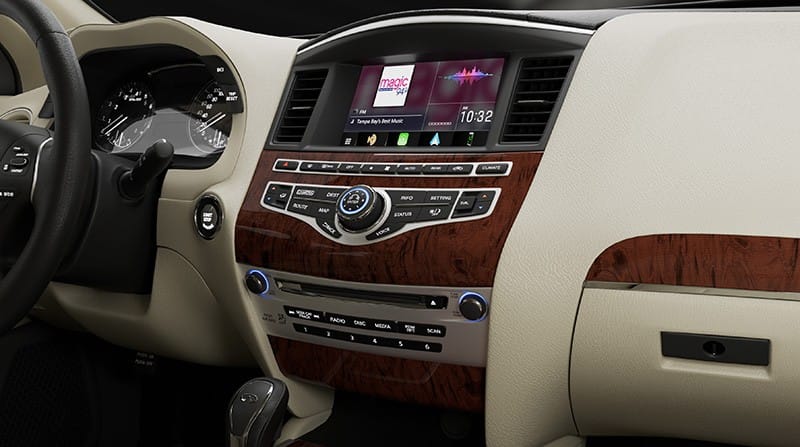
A Kenwood DAX800XR radio installed in the dash of a 2017 infiniti QX60 SUV using the Maestro APX-S8-IN1 kit.

How Does Maestro APX Work?

In a conventional radio upgrade, a mobile enhancement retailer replaces the factory radio and often the trim panel with aftermarket solutions. The new dash kit has an opening for a single-DIN or, more commonly, a 2-DIN multimedia receiver. Some of these dash kits are complicated and expensive, and have to include new displays and interfaces for climate controls. Due to space limitations on the dashboard, many kits relocate the radio to a lower, less convenient location. Another drawback is that the radio display often shrinks from 8 inches to 7 inches or less. However, vehicle owners can now have state-of-the-art audio playback and smartphone integration, ready for connection to signal processors, amplifiers, and high-quality speakers.

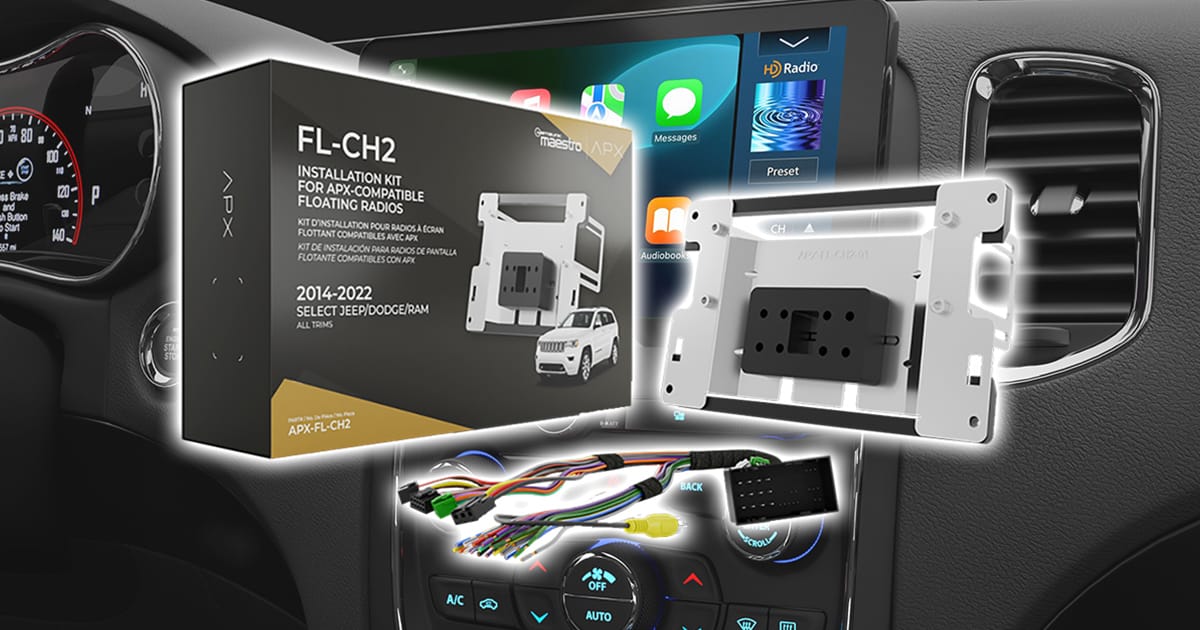
The Maestro APX kits include two components – mounting brackets for a screen and a T-harness. The harness handles connections to the factory wiring and to a Maestro RR or RR2 interface. The brackets allow the new screen included with the Kenwood or JVC radio to mount in or in front of the dash. In short, the new radio replaces the factory screen with a premium source unit.

Maestro APX
A Maestro RR or RR2 handles integration with the factory control and allows the radio to display vehicle information from the CAN bus.

Maestro Floating and Eight-Inch Kits

There are two types of APX kits – APX-FL for floating-face radios and APX-S8 for eight-inch display solutions.

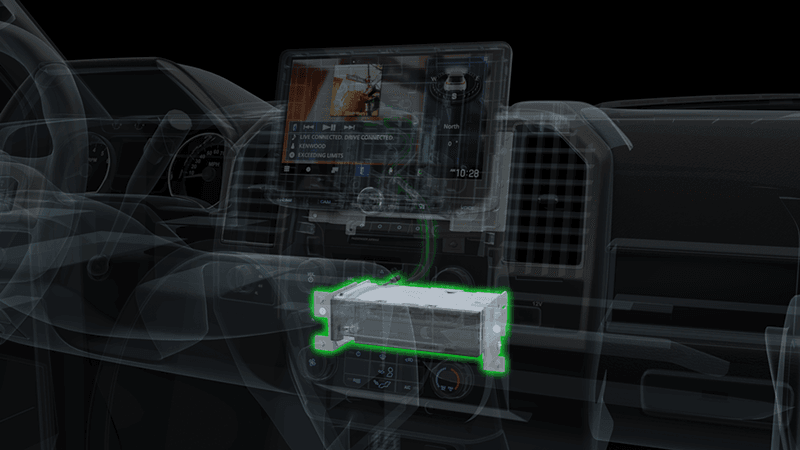
The APX-FL kit, like those for the Jeep Wrangler, allows a radio with a 10.1-inch floating face display to be integrated into the vehicle. Unlike DIN- and 2-DIN floating-face solutions, the radios compatible with the APX-FL kits are a true two-part solution. The radios are designed with a hide-away brain and a screen that attaches with a few harnesses. Depending on the kit, the radio brain may be installed in place of the factory CD mechanism or on the back of the display mounting bracket. Where possible, factory mounting brackets are used, but the Maestro kits include beautifully crafted brackets where needed. Spacer blocks and trim pieces are included so your installer can fit the screen up tight against the dash.

Maestro APX
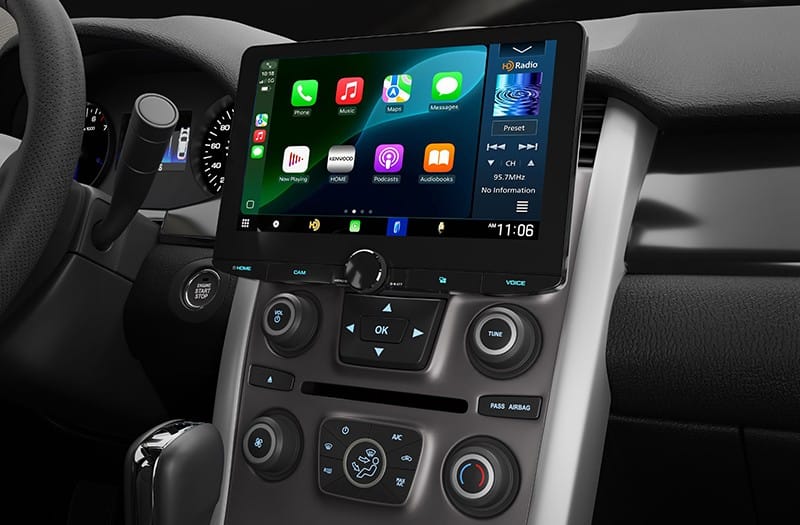
A Kenwood DAX1050XR installed in a 2014 Ford Edge using the APX-FL-FO1 kit.

The APX-S8 kits are designed for a two-part radio solution that includes an eight-inch screen that replaces the factory screen. Brackets are provided as needed to ensure the new display fits perfectly into the dash. The result, once the upgrade is complete, is that the dash looks just like it did from the factory. All the radio and climate controls continue to function with the new radio, thanks to the Maestro RR or RR2 integration module. The same goes for the radio control buttons on the steering wheel.

Maestro APX
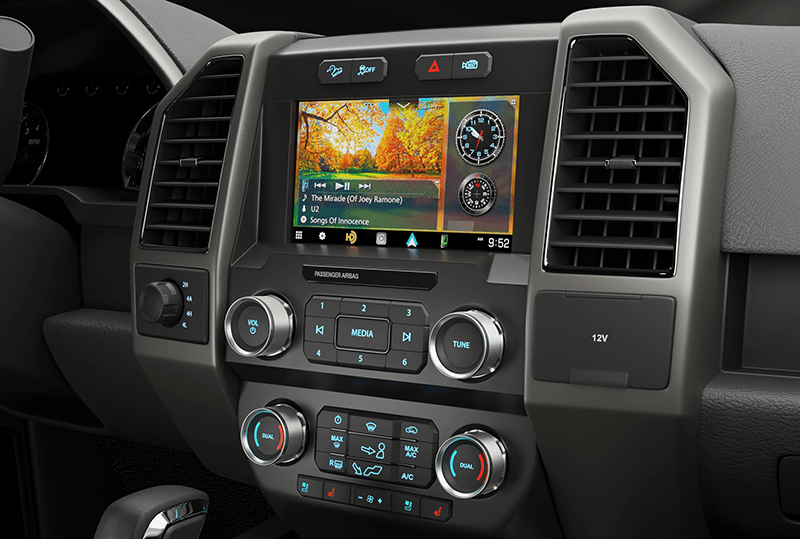
A Kenwood DAX8000S installed in a Ford F-150 dash using an APX-S8-F01 kit.

APX Kit Applications

As of now, ADS offers kits for many Ford, GM, Chrysler, Jeep, Dodge, Ram, Holden, and Infiniti/Nissan vehicles. You can check the ADS Maestro website to see if there’s a Maestro APX radio upgrade solution for your application. A key benefit of the design is that new kits can be created in the future if a compatible platform emerges.

Maestro APX
An example of how the radio brain is installed in place of the factory CD mechanism in a Ford F-150.

The ADS marketing team noted that there are almost five million vehicles on the road globally compatible with their Maestro APX kits, opening up new technology-upgrade opportunities for millions of vehicle owners. If you want to upgrade your car or truck, check the ADS Maestro website for a compatible Maestro APX kit, then choose a JVC or Kenwood radio that meets your needs. From there, an authorized dealer for the radio brand can bring your plan to fruition, and you can enjoy all the features of a modern vehicle in your older car, truck or SUV.

This article is written and produced by the team at www.BestCarAudio.com. Reproduction or use of any kind is prohibited without the express written permission of 1sixty8 media.

Filed Under: ARTICLES, Car Audio, PRODUCTS, RESOURCE LIBRARY Tagged With: iDatalink Maestro

When it Comes to Subwoofer Specifications, Some Numbers Don’t Matter

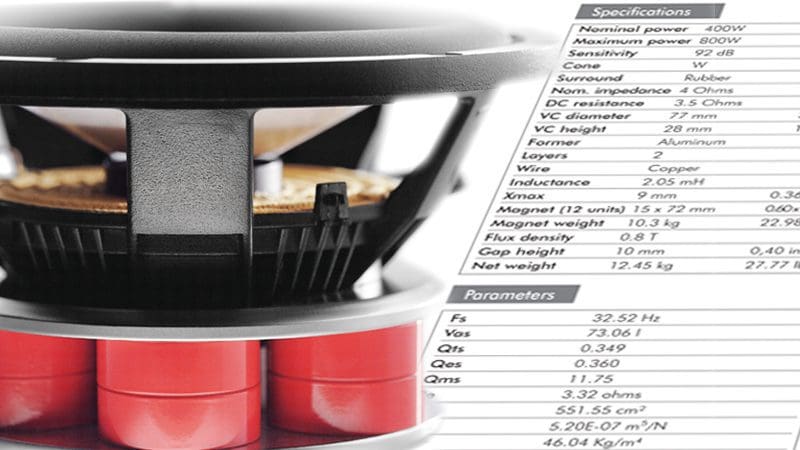
Subwoofer SpecificationsIf you are a mobile electronics enthusiast like we are, then it’s quite possible that you enjoy reading product specifications. You can learn a lot about the design and application of a product from the specs. Amplifier power ratings are probably the most popular specs, but there are a lot more. One product specification that tends to confuse people more than help them is speaker efficiency. This article explains what the numbers mean and how you should analyze the appropriateness of subwoofer specifications, one subwoofer to another.

Speaker Efficiency

Subwoofer SpecificationsIn a nutshell, the efficiency specification attempts to quantify how much sound a speaker will produce when provided with a given amount of power. Manufacturers provide the specification in two common methods. The most common are decibels of output when fed with 1 watt of power and measured at 1 meter from the speaker, written as 1 W/1 m. The other specification method involves replacing the 1 watt power measurement with 2.83 volts. For a 4 ohm car audio speaker, 2.83 volts works out to 2 watts of power or 4 watts into a 2 ohm speaker. Make sure to take the impedance of the speaker into consideration with the latter format.

For a subwoofer, we derive this efficiency number with a formula that includes the driver’s resonant frequency, equivalent suspension compliance and driver’s electrical Q. In reality, the resulting number is purely theoretical and applies most directly to output in the frequency range above where most subwoofers play. There is the heart of the matter: The efficiency specification doesn’t describe how loud the subwoofer is at low frequencies. The only way to predict and compare performance is to model the behavior of the driver in simulation software.

Frequency Response Simulation

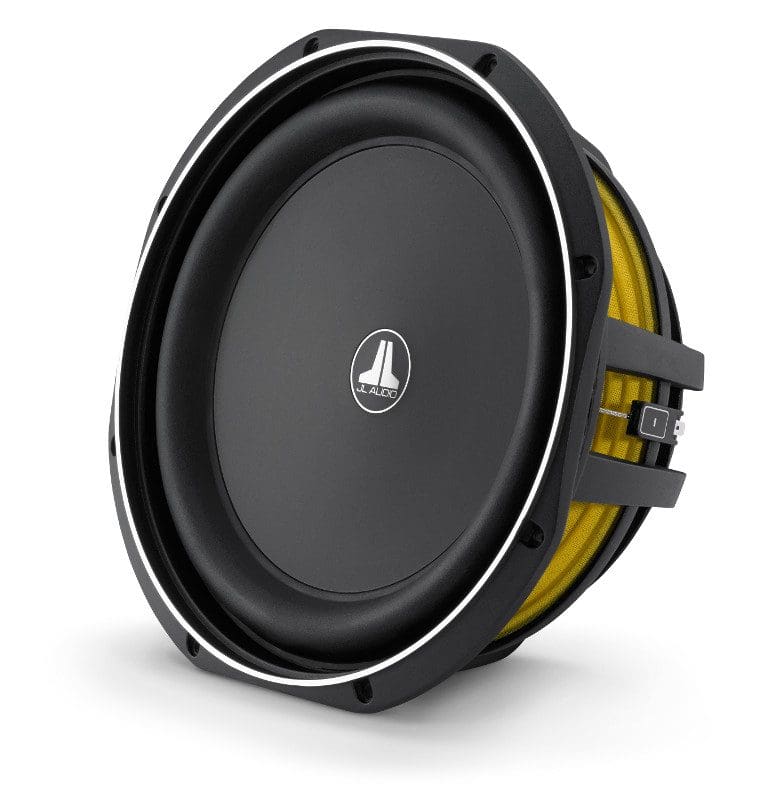
Let’s compare two 10-inch speakers. For sample A, we will use a very high-quality car audio subwoofer. Since we want to make this example somewhat extreme, we will use a 10-inch pro audio woofer as Sample B in our comparison. We will use BassBox Pro 6 to make the comparisons.

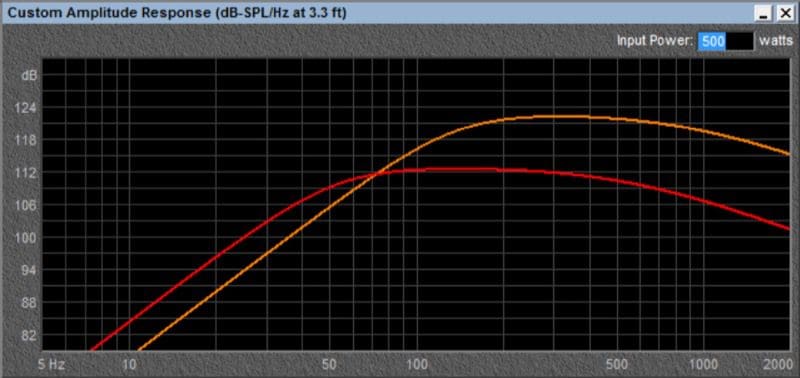
Sample A has a calculated efficiency of 93.21 dB when driven with 2.83 V. Sample B has an efficiency of 95.07 dB. Without modeling the low-frequency behavior of the driver, you’d happily think that Sample B was the louder of the two by 1.86 dB.

We modeled each driver in a sealed enclosure with a volume that provides a total system Q (Qtc) of 0.707. The car audio subwoofer is in 0.694 cubic feet, and Sample B is in 0.378 cubic feet net.

Subwoofer SpecificationsAs you can see from the graph, the output of the two woofers varies dramatically. Sample A is louder at 40 Hz by an impressive 4.95 dB. That is contradictory to the efficiency specification, isn’t it? It is, however, not wrong.

Subwoofer Specifications

When an engineer designs a speaker, the first thing to decide is the application. Will this be a high-SPL car audio speaker, or a pro-sound speaker? The differences make a great deal of difference.

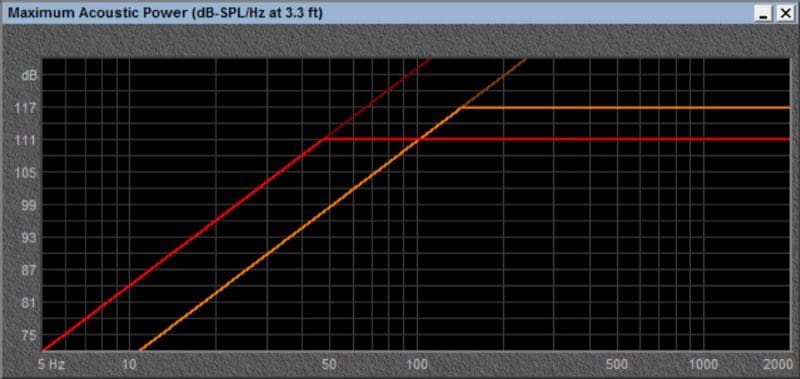
Our sample subwoofers also have dramatically different excursion capabilities. Sample A has an Xmax of 17.6 mm and Sample B has an Xmax of only 4 mm. It is worth noting and reminding everyone that cone excursion quadruples for every halving of frequency. If these speakers were given enough power to play 100 dB at 80 Hz with an excursion of 1 mm, then they would need to move 4 mm at 40 Hz. At 20 Hz, they would need to move 16 mm. An excursion requirement of 16 mm is no problem for Sample A, but will likely rip Sample B to shreds.

Comparing the output of two drivers requires that we ensure the driver can handle the excursion requirements necessary to meet our needs.

Subwoofer SpecificationsIn the case of our subwoofer simulations, due to excursion limits, Sample B can produce a maximum output of only 94.9 dB at 40 Hz. Sample A can produce 108.3 dB at the same frequency. That is a difference of 13.4 dB. This difference is significant. Sample B simply cannot produce 100 dB of output at 40 Hz in this enclosure. Thus, Sample B not a suitable choice for a subwoofer, which makes sense, since it was designed to be a bass guitar speaker.

Choosing the Right Subwoofer

Subwoofer SpecificationsUnless you own speaker-modeling software and know how to use it, it can be tricky to determine the performance of one subwoofer versus another. Even more difficult is attempting to predict how one sounds when compared to another. Frequency response is just one of the many criteria that differentiate one subwoofer from another. Excursion capabilities, enclosure requirements, distortion characteristics and – of course – cost are all factors to be considered.

Many people think that just because it is harder to hear distortion at low frequencies, the design of a subwoofer matters less than that of a midrange speaker. You would be stunned at how a good subwoofer can bring out details in your music that you may have never heard before.

When it is time to go subwoofer shopping, visit your local mobile electronics specialist retailer. Discuss your needs with them and work with them to find a subwoofer solution that fits your application. You will be happy that you did.

This article is written and produced by the team at www.BestCarAudio.com. Reproduction or use of any kind is prohibited without the express written permission of 1sixty8 media.
Filed Under: ARTICLES, Car Audio, RESOURCE LIBRARY

Basics of OEM Integration in Your Newer Vehicle

OEM IntegrationInstalling a mobile audio system involves much more than just hooking up some wires and driving in a few screws. Almost all vehicle manufacturers have realized that some amount of audio system tuning will dramatically improve their customers’ experience. When you decide it’s time to upgrade your factory audio system, we need to take into account any tuning that may have been done by the factory. It’s not easy, but at the same time, it’s not impossible. This article provides a brief look at what is involved in connecting a new amplifier and speakers to your factory source unit or amplifier, or as it is called, OEM integration.

It’s Not Flat

No, we aren’t talking about the Earth. One of the first steps in designing a premium audio system upgrade is to measure the electrical signal that is being sent to each of your speakers. Why? As we mentioned, more and more factory source units and amplifiers include advanced signal processing. Even some of the most basic audio systems with only four speakers have custom equalization for each speaker. Once our installers know what they are dealing with, they use that information in designing your new system.

OEM IntegrationThe signal measurement process should be done before system design. If the signal is flat (no equalization), then the system design may take a different direction from when the signal is equalized. Compensating for factory equalization requires that some kind of equalizer be installed in the new system. Either way, we have to allot time to measure the acoustical response of the new system and make appropriate adjustments.

Think of this process as though your installer were a surgeon preparing to solve a medical problem for you. The surgeon will order x-rays, scans and many tests long before you’re on the operating table. Nobody wants to start work on a project without knowing what they are dealing with. Modern car audio systems are no different.

Front and Center

OEM IntegrationAutomobile manufacturers strive to make all their customers happy – within a certain budget. This goal includes providing an enjoyable audio experience for everyone in the vehicle. Many mid- and high-level factory audio systems use a center channel to help create a listening experience that is enjoyable for both occupants of the front seats. Configured properly, a center channel can help create a realistic soundstage from both seating positions. Trust us when we say that some of the people who tune these factory audio systems have a lot of experience doing what they do.

When we want to upgrade the audio system in a vehicle with a center channel, we have to reverse-engineer how that speaker is functioning. Is it a mono signal that is the sum of the left and right signals? Is it an up-mixed signal that plays sounds that are not reproduced by the left and right speakers? It could also be a little bit of both. Your installer will have to do some tests to decide what is happening and how to deal with it.

Do We Undo or Up-do?

OEM IntegrationIf you have a vehicle with a genuine up-mixed center channel, one of the best ways to upgrade the audio system is to leave the processing alone and add better speakers, amplifiers and signal processing. With this method, we can create a sound system that sounds amazing from both the driver and passenger seats.

The basic concept is to take the left, center and right signals; recombine any frequency filtering; then send those three signals to whatever speakers you choose for each side of the vehicle and the new center channel. Often, the new system will be a three-way speaker set in the doors and maybe the A-pillars, and a two-way system in the center. We will most certainly use a digital signal processor and/or an integration processor to do the signal filtering and tuning for the new system.

How We Undo What They Do

OEM Integration
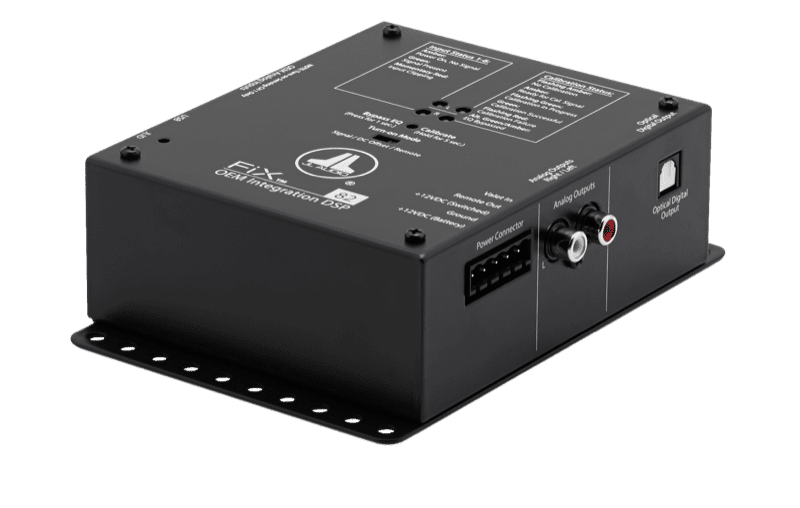
The JL Audio Fix 82 can “fix” a number of factory signal problems.

Several processors on the market can sum filtered channels together and undo factory equalization and time alignment. Some of these processors require manual adjustments and some work automatically with a custom setup track. After using one of these processors to provide a full bandwidth signal, we can then use digital signal processing to set up the new system and compensate for the vehicle acoustics. Just as the vehicle manufacturer chose to equalize the signal going to each speaker, we need to do this to maximize the performance of your new system.

What if We Don’t Undo What They Did?

Imagine a simple scenario: You have a car, perhaps a Nissan Altima. Even the base model audio system has equalization in this vehicle. Equalization is based on the speaker that is being used, location of the speaker and acoustic effects of the vehicle on the signal from that speaker relative to the listening position. If we change the speaker to one that is better, the factory equalization can – and most likely will – work against us. That nice new speaker may sound worse than the cheap factory speaker. After all, the manufacturer tried to make what was likely a low-quality speaker sound OK.

Trust Your Local OEM Integration Experts

When it comes time to upgrade the audio system in a fairly new vehicle, make sure you are working with a mobile electronics retailer that knows how to evaluate the existing audio system properly. If you are changing the source unit, then it’s no big deal. But if you are using the factory radio and/or amplifier, proper testing is crucial. Don’t be scared or discouraged. A well-trained retailer can transform any audio system into something truly amazing! Drop in and see what they can do for you.
This article is written and produced by the team at www.BestCarAudio.com. Reproduction or use of any kind is prohibited without the express written permission of 1sixty8 media.
Filed Under: ARTICLES, Car Audio, RESOURCE LIBRARY

Product Spotlight: KICKER KEYLOC

KICKER KEYLOC

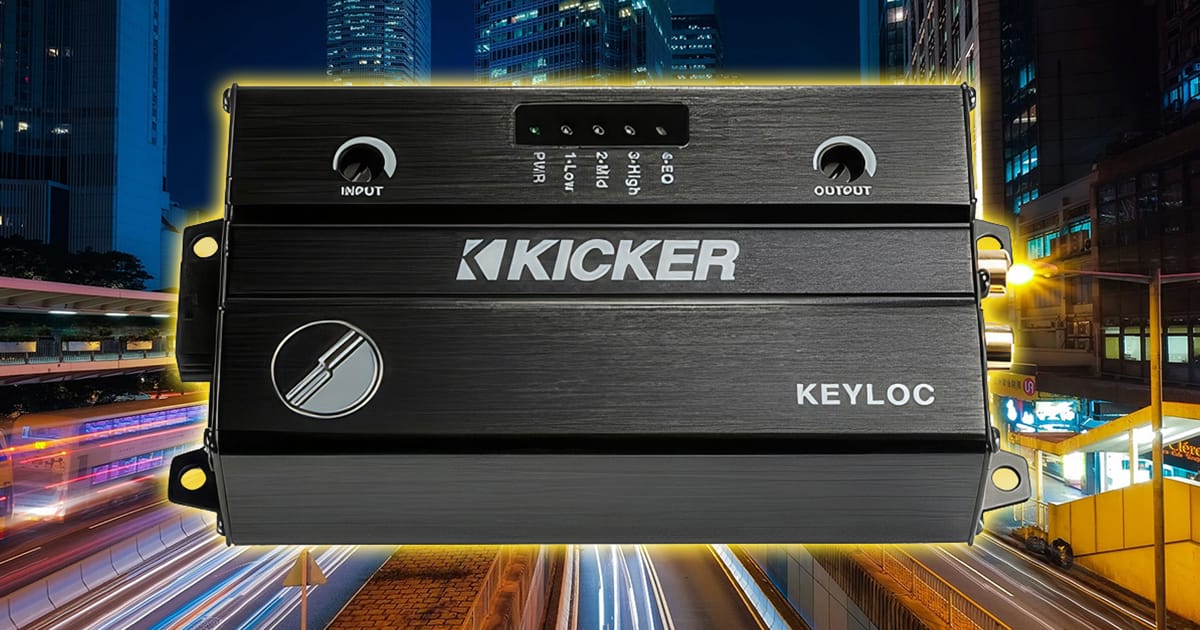
There are a dozen or so high-quality line output converters available to help your installer integrate an amplifier into a factory-installed audio system. That said, most of them are simple devices that do nothing more than adjust voltage gain and perhaps apply some equalization to the signal. KICKER’s KEYLOC is a unique solution because it features a built-in digital signal processor that undoes equalization, delays, and all-pass filters applied to the factory signal. The goal is to establish a clean signal that you can build on. Let’s check out the outstanding KICKER KEYLOC.

Basic Features of the KICKER KEYLOC

Let’s start with the basics. The KEYLOC is a two-channel line output converter that can accept up to 10 volts of signal in low-level mode and an impressive 40 volts in high-level mode. In low-level mode, the KEYLOC presents a 60-ohm load to the driving amplifier. Many factory-installed source units and amplifiers will go into protection mode without a proper load. External resistors are available from KICKER if needed for high-level operation. The maximum output of the KEYLOC is 10 volts.

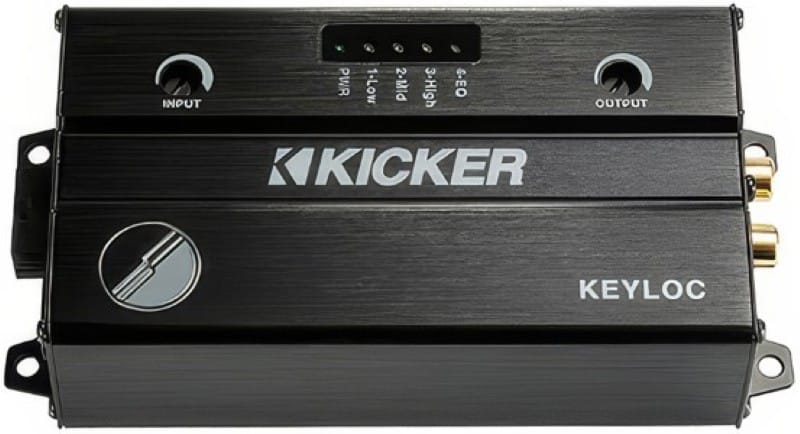
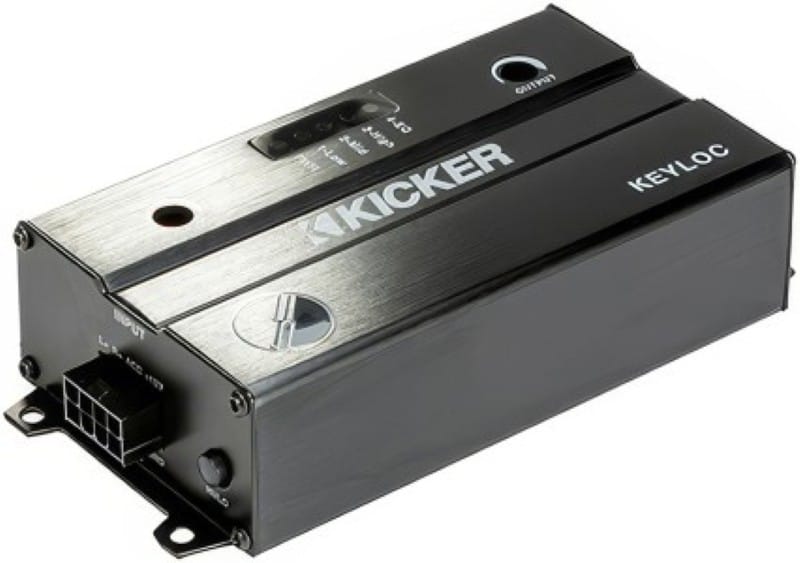
The KEYLOC measures 5.5 by 2.75 inches in footprint and is 1.375 inches thick. A Molex connector on the left side includes two speaker input channels, power and ground connections, and remote turn-on and remote output wiring. The remote output activates automatically when the KEYLOC detects a DC offset voltage on the input speaker wires, enabling an aftermarket amplifier to turn on. There are a pair of RCA output jacks on the right side of the chassis to feed your new amplifier.

The top panel of the KEYLOC features two stereo potentiometers and a display with five LEDs. The pots are for adjusting input sensitivity and output voltage. The LEDs indicate power and are part of the signal testing and KEY processing features of the KEYLOC.

KICKER KEYLOC
The LED display on the front panel of the KEYLOC provides your installer with information about frequency response and correction processing.

Audio Analysis Tool

Depending on the design of your factory audio system, it might be difficult to find a full-range signal. The Low, Mid, and High LEDs on top of the KEYLOC can be used with the provided pink-noise test track to determine whether you have a full-range signal. The Low indicator illuminates when there is sufficient audio information in the 20 Hz to 200 Hz range. The Mid indicator monitors 200 Hz to 2 kHz, and the High LED monitors audio above 2 kHz. If you are missing low- or high-frequency information, the KEY processing will not produce a full-bandwidth signal for your new equipment.

The KEY to Audio Excellence

The KEYLOC uses KICKER’s patent-pending KEY algorithm to analyze a special audio test signal. The signal includes sine sweeps, pink noise, and impulses, which reveal frequency response, signal delay, and all-pass filter processing. Once measured, the KEYLOC applies its own signal processing to eliminate these attributes from the audio signal. The result is a flat frequency response signal that will allow new speakers, amplifiers, and processors to sound amazing. The process is fully automated and takes between two and 10 minutes to complete. Your installer can even temporarily bypass the correction to demonstrate how much the system has improved thanks to the KEYLOC.

KICKER KEYLOC
The KEYLOC is small enough to hide behind the radio in your dash, yet powerful enough to correct even the most complex audio signals.

Why You Need the KICKER KEYLOC

Factory-installed audio systems are typically designed to extract the best possible performance from inexpensive speakers. As such, radios and amplifiers include signal processing such as equalization, delays, and all-pass filters to create an optimized listening experience. Don’t be fooled: this processing is present even in simple “radio-only” systems and isn’t exclusive to premium systems with complex multi-channel amplifiers.

The goal of upgrading a car audio system is, of course, to make it sound better. As such, you are likely to add subwoofers and new speakers to the vehicle. The equalization that worked with the factory speakers is not likely to be ideal for the higher-performance options you’ve chosen. Eliminating factory processing with a product like the KICKER KEYLOC is crucial to achieving great sound in your car, truck, or SUV. The KEYLOC is also great for motorcycles, side-by-sides, and marine applications.

Visit a KICKER Dealer Today

When it’s time to make your vehicle’s stereo sound better, drop by an authorized KICKER retailer to find out whether the KEYLOC is needed to undo the signal processing built into your factory-installed audio system. You can find an authorized KICKER retailer near you using the Dealer Locator on the KICKER website.

Be sure to follow Kicker on Facebook, Instagram and YouTube to keep up with the latest product releases from our friends in Stillwater.

This article is written and produced by the team at www.BestCarAudio.com. Reproduction or use of any kind is prohibited without the express written permission of 1sixty8 media.
Filed Under: ARTICLES, Car Audio, PRODUCTS, RESOURCE LIBRARY Tagged With: KICKER

  • 1
  • 2
  • 3
  • …
  • 9
  • Next Page »

Recent Articles

One term that has been over-abused in the mobile electronics field lately is Bluetooth. This article explains what Bluetooth is, and how it is used.

What is Bluetooth?

March 1, 2026 

If you have been around the mobile electronics industry for any amount of time, you will know that certain terms are often used incorrectly. One term that has been over-abused … [Read More...]

ADS iDatalink Maestro APX Kits

Product Spotlight: ADS iDatalink Maestro APX Kits

February 2, 2026 

In February of 2025, Automotive Data Solutions (ADS) introduced the world to a new way of installing car radios. In their presentation, they discussed how aftermarket source unit … [Read More...]

A subwoofer and a list of its specifications

When it Comes to Subwoofer Specifications, Some Numbers Don’t Matter

February 1, 2026 

If you are a mobile electronics enthusiast like we are, then it’s quite possible that you enjoy reading product specifications. You can learn a lot about the design and application … [Read More...]

The steering wheel and dash of a vehicle

Basics of OEM Integration in Your Newer Vehicle

January 4, 2026 

Installing a mobile audio system involves much more than just hooking up some wires and driving in a few screws. Almost all vehicle manufacturers have realized that some amount of … [Read More...]

Testimonials

Dream Center

Very happy! 4 remote starts installed in 4 hours

Friendly and knowledgeable service!

We went in not knowing where to start on our electrical issues with a new vehicle. Not only was the issue identified and fixed, but Lee explained how things worked so we could understand now and in the future. We also got two sound systems installed and could not be happier. Would recommend 5sixty3 to anyone looking for quality work to be done on a vehicle!

Ford Ranger Trim Package

Lee and his company are not something I would have ever expected to find in Dubuque. His work is top notch. His knowledge is unmatched. His professionalism is just not something you see every day. I will be back with my next project!

Now Available!

Audio Dynamics

Audio Dynamics

At 5sixty3 Sound, we’re committed to bringing you the best in car audio, and that’s why we’re proud to offer the full line of Audio Dynamics … LEARN MORE

Location


Get Directions to 5Sixty3 Sound

Find Us

5Sixty3 Sound

3366 Center Grove Drive Suite 4
Dubuque, IA 52003
563-239-1931

Connect With Us

  • Facebook

Services

  • Car Audio
  • Custom Installation
  • Marine Audio
  • Remote Starters
  • Safety Cameras

Store Hours

Monday, Tuesday, Wednesday, Thursday, Friday10:00 am – 5:00 pm

Copyright © 2026 5Sixty3 Sound · Privacy Policy · Website by 1sixty8 media · Log in


Loading Comments...